Architecture and deployed paths
Documentation index
Contents
OS inventory panes
The dashboard groups available images and ID-specific containers by OS family,
including native RedHat, Rocky Linux, AlmaLinux, Oracle Linux, CentOS Stream,
Fedora and SQL Server, plus Windows, Windows Server, Ubuntu and macOS VMs.
The stage-images helper accepts running supported native generic bases and ready
captured VM images; stopped unknown native bases are not treated as available.
Existing containers remain associated with their collected OS metadata. Footer
leaf previews can display disabled sample choices without creating an image or
container. Preview visibility grants no operational permission.
Native containers share the host kernel. Desktop images use QEMU through their
Podman wrappers, with private disks and paired RAM/device startup captures.
VM-backed Ubuntu VPN operations use its private guest agent, not the wrapper's
shell. Windows/macOS do not expose direct native VPN controls; their wrapper
traffic can participate in an explicitly selected shared gateway. See
networking and image lifecycle.
Private pane notes and shared customer notes
Pane change-request notes are private to the authenticated mgreen browser
session. Both browser and v2 notes routes require that named session; API keys
identify scopes and cannot prove note ownership. Writes require the configured
Origin and current revision; stale revisions return 409. These notes are limited
to 20,000 characters and stored in pane_notes in the identity database. The
installer clears this disposable change-request table on update. Separate
personal_notes remain private and preserved, and are excluded from automated
change-request scans.
Shared customer-ID notes use GET/PUT /mykos/api/web/id-notes/{id} and the
shared_id_notes table. Every signed-in user, including a read-only dashboard
user, can edit them. Writes require Origin and revision; responses identify the
last editor. They belong to an eight-digit ID and survive updates and container
recreation. The release does not apply the proposed RTI/Dove role matrix to these
routes; do not infer per-POS authorization from map labels or pane visibility.
Host performance history
The dashboard plots six colored series (CPU, Memory, Load, Disk, Containers, and
VPNs) across a five-minute window. The first
reading starts in the middle, and readings advance to the right as time elapses.
After two and a half minutes the graph scrolls to retain the most recent five minutes.
Host resource readings refresh every three seconds, independently of the heavier
inventory polling. The timeline uses animation frames capped at 20 redraws per
second while visible. New line readings ease into place over one second; recorded
samples, tooltips, count bars and alerts retain their actual values. Reduced-motion
preferences disable easing and limit timeline redraws to once per second.
Dashboard reloads share the same sampling limit, so they cannot add extra host polls.
Only one host-metrics request runs at a time; requests time out after five seconds.
History is collected independently of an open browser and retained for 30 minutes
in the host SQLite history store. Reloading or logging out does not clear it;
no synthetic readings are backfilled before collection began. CPU, memory and root disk use percentage values.
Load is normalized by CPU count. Containers and VPNs use downward bars from the
100% line: all running/up reaches 50%, half reaches 75%, and none reaches 100%.
Actual counts remain in the legend. No bar is drawn when there are no eligible
configured resources or their totals are unavailable. Graph denominators come
from the installed /usr/local/share/mykos/pos folder: top-level
.[eight-digit shopcode].container regular files for Containers, and all regular
*.conn.conf files recursively for VPNs. Symlink files and directories are ignored.
The root node collector publishes these counts in status.json; host metrics
exposes them as graph_totals while the collector snapshot is at most 120 seconds
old. Neither inventory nor pane visibility uses these file totals. Running/up
numerators retain their existing container-status source (VPN up counts containers
with an up VPN, not individual established tunnels).
CPU, Memory, Load, and Disk remain line series.
Labels toggle individual lines, and pointer or keyboard inspection shows samples.
CPU, memory, disk and normalized load receive amber emphasis at 75% and red at
90%, including legend highlights, point rings and a textual status message. Healthy
100% availability counts do not trigger resource alerts. Gaps and unavailable
readings remain visible instead of being interpolated across missing polls.
Chart readings expire after 25 seconds. Backups and Repos remain in their own
management panes and are excluded from the performance chart.
The chart consumes the existing browser endpoints. API clients can retrieve the
same current readings through /mykos/api/v2/host/metrics, /backups, /repos
and /nodes under the API v2 prefix. /host/history exposes the retained
30-minute history through read/admin API keys.
The host row below the graph uses the container row's typography, columns and icon
sizes. Its Host field is the hostname. Version is the host OS version, IP is the host's
internal IPv4, memory/uptime use host metrics, and VPN status comes from the root
collector's host ipsec status check. The hostname opens host details, memory opens host
processes, VPN opens host IPsec status, and the green log icon opens the host
journal. The blue terminal opens su - root on the host and retains the existing
admin/session/Origin/terminal-enabled checks. The red reboot icon requires a user
confirmation and administrator authorization, then a helper exact-hostname check
before scheduling reboot after five seconds. Reboot and terminal tests use mocks;
verification never reboots the host. These host actions have API v2 equivalents.
The footer's green leaf link previews the EL OS panes (RedHat, Rocky Linux,
AlmaLinux, Oracle Linux and CentOS Stream) and utility panes, including their
navigation links. Fedora, Ubuntu, Windows, Windows Server, macOS and SQL Server
retain support and normal visibility when images, builds or containers are
available; the leaf does not reveal their empty preview panes. The preference is
stored locally in the browser; turning it off restores automatic visibility.
It does not change permissions or enable staging when images are unavailable.
Empty preview panes show disabled example choices and two labeled sample rows.
Samples exist only in the browser, never enter inventory/graph/API counts, and
disappear when real rows arrive or the preview is turned off.
Vendor pane icons use recognizable brand silhouettes in the dashboard's blue.
Red Hat, Ubuntu and Apple SVG outlines are inlined from the Simple Icons project
(CC0): https://github.com/simple-icons/simple-icons/tree/develop/icons. Windows
uses the modern four-equal-pane mark. Assets are bundled in the HTML and require
no external icon requests at runtime.
Components and trust boundaries
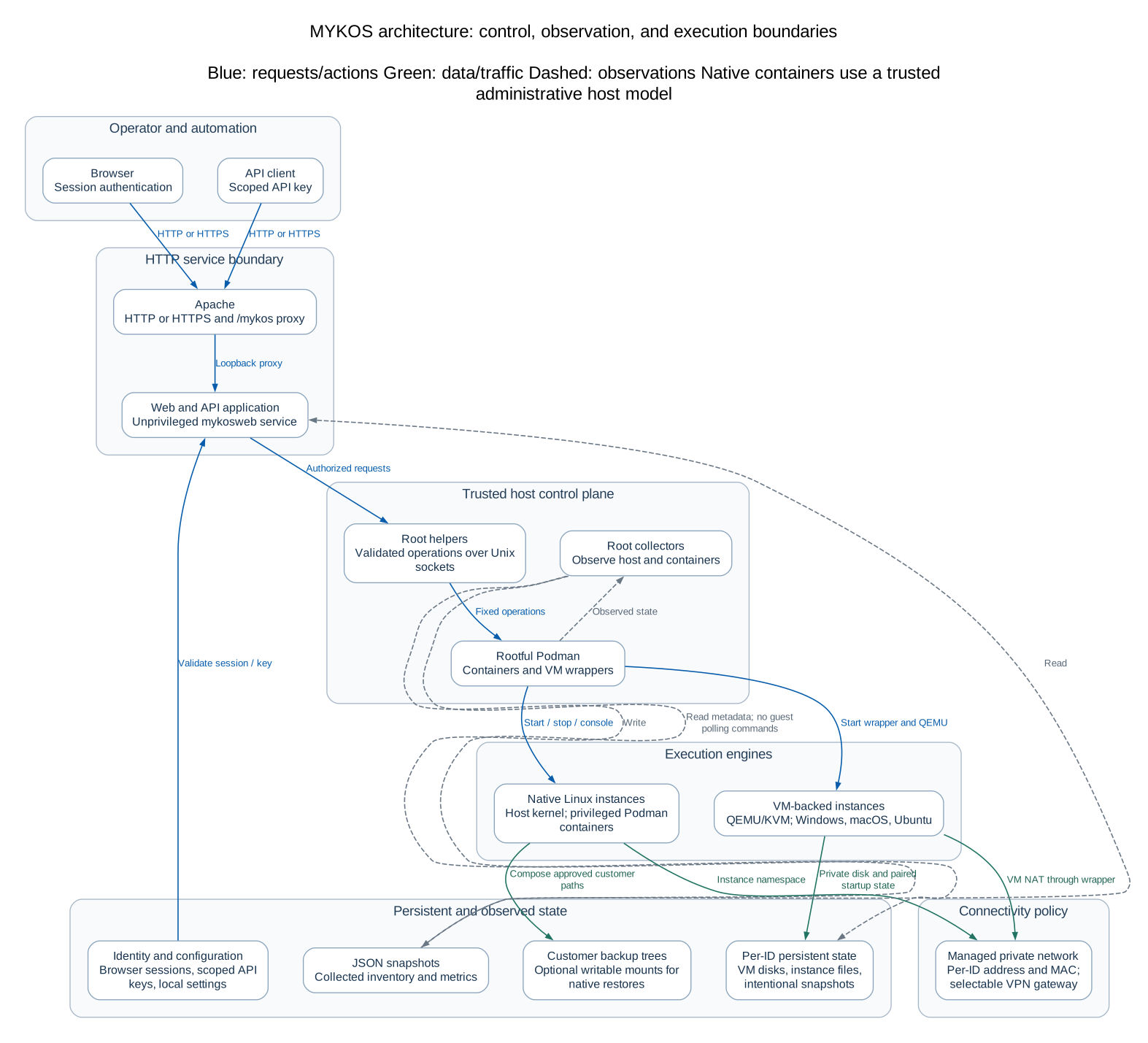 Open full-size diagram
Editable Mermaid source
The operator CLI (mykos) changes directory into /usr/local/share/mykos and opens
MENU. The back, pos, repo, and data submenus invoke the legacy scripts.
The scripts assume Linux administration rights and conventional host directories;
they are not a portable desktop application.
The web service is a separate, unprivileged FastAPI/Uvicorn application. Apache
terminates HTTPS and proxies /mykos/ to 127.0.0.1:8000/. Internal route paths omit
/mykos; FastAPI advertises /mykos as its public root. The supplied Apache file is a
VirtualHost example, deliberately not installed into an existing shared server.
Root collectors discover Podman containers named eight-digit shopcodes, optionally
followed by a hostname. They write JSON snapshots. The web application reads those
snapshots and joins inventory, node state, network, VPN, resources, and RTI metadata.
Snapshots older than 120 seconds are marked stale and their observations are omitted
from API v2 data. Unknown values do not prove a node is healthy or unhealthy.
Privileged actions use two separate Unix sockets. The app authenticates sessions,
API keys, and roles before contacting them. systemd owns socket permissions and
starts one root helper per connection; helpers check the peer UID, validate ASCII
shopcodes, enumerate real Podman targets, and execute fixed argument arrays.
The separate scheduled-command API accepts admin-key-authorized root shell and
Windows guest PowerShell scripts. Its queue and results are root-private, and a
30-second systemd timer dispatches isolated workers. The mykosweb service identity is nevertheless
trusted to invoke privileged operations: do not grant interactive access to it.
The terminal socket additionally requires terminal_enabled: true. It opens a PTY
inside the selected container as its default user (normally container root). Browser
access requires an administrator role, a valid session, and the configured Origin.
API keys cannot open terminals. A terminal grants powerful access to a privileged
container and its mounts; enable it only when that access is intended.
Files and owners
| Path |
Owner / purpose |
/usr/local/share/mykos/ |
root; menus, toolkit, maintained source copy, docs |
/usr/bin/mykos (also /bin/mykos on RHEL) |
root; executable operator launcher |
/opt/mykos-web/ |
root:mykosweb; application code, inventory, venv |
/opt/mykos-web/data/ |
mykosweb:mykosweb, 0700; identities and snapshots |
/etc/mykos/web.env |
root:mykosweb, 0640; Origin and cookie settings |
/etc/mykos/config.json |
root, 0600; staging image, host NIC, terminal toggle |
/etc/mykos/pos.env |
root, 0600; legacy POS repo and VPN credentials |
/usr/local/sbin/mykos-*, mykos_runtime.py |
root; managers and fixed-operation helpers |
/run/mykos-container-admin.sock |
root:mykosweb, 0660; JSON request/reply |
/run/mykos-terminal.sock |
root:mykosweb, 0660; JSON shop handshake then raw PTY bytes |
/var/lib/mykos/jobs/ |
root, 0700; per-shop staging locks and job state |
/var/lib/mykos-installer/installed.json |
root, 0600; managed file manifest |
/var/backups/mykos-installer/ |
root, 0700; rollback snapshots, archives 0600 |
/backups/tfrsync-SHOP/ |
backup account; POS data, SSH access, subscriber marker |
/var/www/html/ |
host Apache content; repository mirrors and optional TSR copies |
Application files are not writable by the web user. Only its data directory is
writable in mykos-web.service. Collectors and privileged helpers run as host root
and inspect rootful Podman storage. Rootless containers belonging to other
accounts are outside their inventory. The old POS README's rootless claims do not
describe the current privileged launch commands.
systemd inventory
| Unit |
Behavior |
mykos-web.service |
Unprivileged Uvicorn, loopback port 8000, automatic failure restart |
mykos-collector.service / .timer |
collect-nodes.py; inventory/status; 15 seconds after prior completion |
mykos-details.service / .timer |
collect-details.py; inspection, IPs, RTI version; 30 seconds after completion |
mykos-extended.service / .timer |
collect-extended.py; CPU/memory, eth1 IP, VPN, RTI; 30 seconds after completion |
mykos-container-admin.socket / mykos-container-admin@.service |
Per-connection JSON operations |
mykos-terminal.socket / mykos-terminal@.service |
Per-connection PTY bridge, maximum eight-hour lifetime |
mykos-repo-sync.service |
On-demand background repository sync via the existing toolkit script; not enabled automatically |
mykos-stage@SHOP.service |
Asynchronous per-shop worker; 31-minute systemd timeout |
Timers start about 20 seconds after boot and do not overlap their own service.
Their effective refresh rate includes execution time, which grows with node count.
No repository sync, billing email, TSR publication, blacklist, or backup-account cron
job is enabled by the global installer.
Canonical service names remain mykos-* because the extracted app and deployed
socket paths use them. Toolkit files remain under mykos. Legacy mykos-* unit files
are preserved by deployment; inspect and disable any site-specific duplicates
manually rather than blindly renaming unrelated units.
Staging workflow
POST /api/v2/actions/stage validates an administrator, eight-digit shopcode,
absence of an existing container, configured image/NIC, and optional RTI backup.
It queues mykos-stage@SHOP.service; the request returns promptly. The worker runs
mykos-stage-pos, records queued, running, done, or failed, and stores bounded
output for /jobs/SHOP. Per-shop locks serialize start/stop requests.
The supplied launcher creates a privileged, rootful system container with /sbin/init,
mounts per-shop IPsec configuration, attaches eth1 with the existing pipework and
dhclient, and restarts IPsec. With restore enabled it mounts available legacy RTI
backup paths read/write and restarts tfremote, Samba, CUPS, and RTI. This uses the
backup as live storage; it does not copy or make a new backup. The created container
is removed if a later setup step fails; existing customer data and VPN files remain.
Successful containers persist when stopped, unlike the old CLI's --rm launch.
The new helper refuses staging if a stopped container already exists.
Prepared images, the RTI payload, valid backup content, network topology, working
VPN configuration, subscription access, and in-container /usr/bin/checkit are
external dependencies. The historical helper implementation was absent; these
helpers are compatible replacements based on the extracted application's protocol,
not recovered production binaries. Validate them in staging before enabling writes.