Unattended image builds
Documentation index
Contents
Start or resume a build
Run one command as root, with no account/password or Finish prompts:
sudo /usr/local/sbin/mykos-image-build ubuntu22.04
sudo /usr/local/sbin/mykos-image-build win10
sudo /usr/local/sbin/mykos-image-build wns2022
sudo /usr/local/sbin/mykos-image-build mac15
From the text administration directory, ./vm build OS and the existing
Create Image menu use the same pipeline. Repeating the command resumes an
unfinished unattended build using its existing disks and credentials. --replace explicitly archives a
stopped previous attempt before building again. An active base builder is
never stopped automatically by replacement. Existing ID-specific containers
are not modified by an image build.
Instance startup hooks
Optional ID-specific host scripts live at /etc/mykos/instance-hooks/OS. They
run once after the new instance restores its base state, before startup is
reported successful. Hooks must be executable root-owned files without
group/world write access. Arguments are SHOPCODE and SHOPCODE.hostname;
MYKOS_SHOPCODE, MYKOS_CONTAINER_NAME and MYKOS_OS are also set in the environment.
The running generic base is never passed to these hooks.
Build output and instance storage
A successful build installs and provisions the OS, verifies the installed
system, detaches installation-only devices, captures matching RAM/device/disk
state, commits the installed disk payload under the readable local OS image
name, and leaves one generic base container running. The image payload is
in /opt/mykos-image/golden.tar.gz as a compressed sparse archive, with an
image.json manifest; it is not just the small VM wrapper. Commit temporary
files use the VM storage filesystem instead of filling /var/tmp. Fast
ID-specific startup clones the immutable prepared state into private storage
and restores RAM. Container names remain SHOPCODE.hostname, for example
12345678.prod.mykol.com. Changes made by an instance do not modify the base.
Memory and host dependencies
Runtime guests and their startup captures use 2048 MiB RAM. Unattended macOS
installation temporarily uses 4096 MiB because Apple mounts a 2.5 GiB temporary
filesystem during its second stage. The builder returns to 2048 MiB and verifies
an installed boot before capture. Windows and Ubuntu use 12 GiB pagefile/swap. macOS manages its own swap. New native ID-specific containers use --memory=2g and a read-only
/sys/fs/cgroup mount. The temporary native image-start helper uses 4 GiB;
existing containers retain their creation-time limits. The QEMU image already supplies the ISO tools, and the
macOS package generator uses Python's standard library. No additional helper
containers or host package dependencies are needed for unattended installation.
Build credentials
Accounts default to mykos with a generated complex password. Credentials are
stored, root-only, in /var/lib/mykos/image-builds/OS/credentials.json and reused
for that OS on subsequent builds. They are not printed in progress messages.
The authenticated API can optionally supply a different local account/password.
Ubuntu provisioning
Ubuntu uses Canonical live-server media with autoinstall and installs the
minimal desktop on its first installed boot, avoiding installer-chroot Snap
setup failures. This supports 20.04, 22.04 and 24.04 consistently. Provisioning
includes the direct su - root serial console, swap, Libreswan and QEMU guest
agent. The ISO checksum is checked against Canonical's SHA256SUMS before use.
Windows provisioning
Windows uses the official version-specific Dockur XML asset, with MYKOS account
settings, through its normal Autounattend.xml/media-generation pipeline.
Driver, OEM and first-logon hooks are retained. QEMU Guest Agent is extracted
from the virtio-win data RPM available in the configured RHEL repositories,
after verifying its signature against the host RPM key database. The data RPM
is downloaded but never installed on the host. Guest-side hashes bind the staged
installer to that authenticated payload; there is no unsigned-download fallback. A complex Administrator
password and non-expired local account prevent mandatory password-change
screens. Current unattended builds support Windows 10/11/8.1 and Server
2016/2019/2022/2025. Older Windows releases retain their legacy creation path;
XML is not the setup format for Windows 98/ME/2000/XP.
macOS provisioning
macOS uses Apple's startosinstall from Recovery with a pinned MIT-licensed
Dockur bootstrap (see pos/install/macos/UPSTREAM and LICENSE). Account
packages are generated privately for each build. The bootstrap is passed through
startosinstall --installpackage, so setup suppression and first-boot files are
applied after Apple creates the final system/data volumes. A scoped, expiring completion
token reports that the installed OS has reached WindowServer after account
setup and again after the clean boot before capture. The one-use build daemon
removes itself; this token grants no administrative API access. The configured
HTTPS public origin must be reachable from the guest. For a private CA or
self-signed endpoint, place the trusted PEM certificate in
/etc/mykos/image-build-ca.pem (root-owned, not group/world writable). The guest
uses it for certificate and hostname verification; TLS verification stays enabled.
Images containers and snapshots
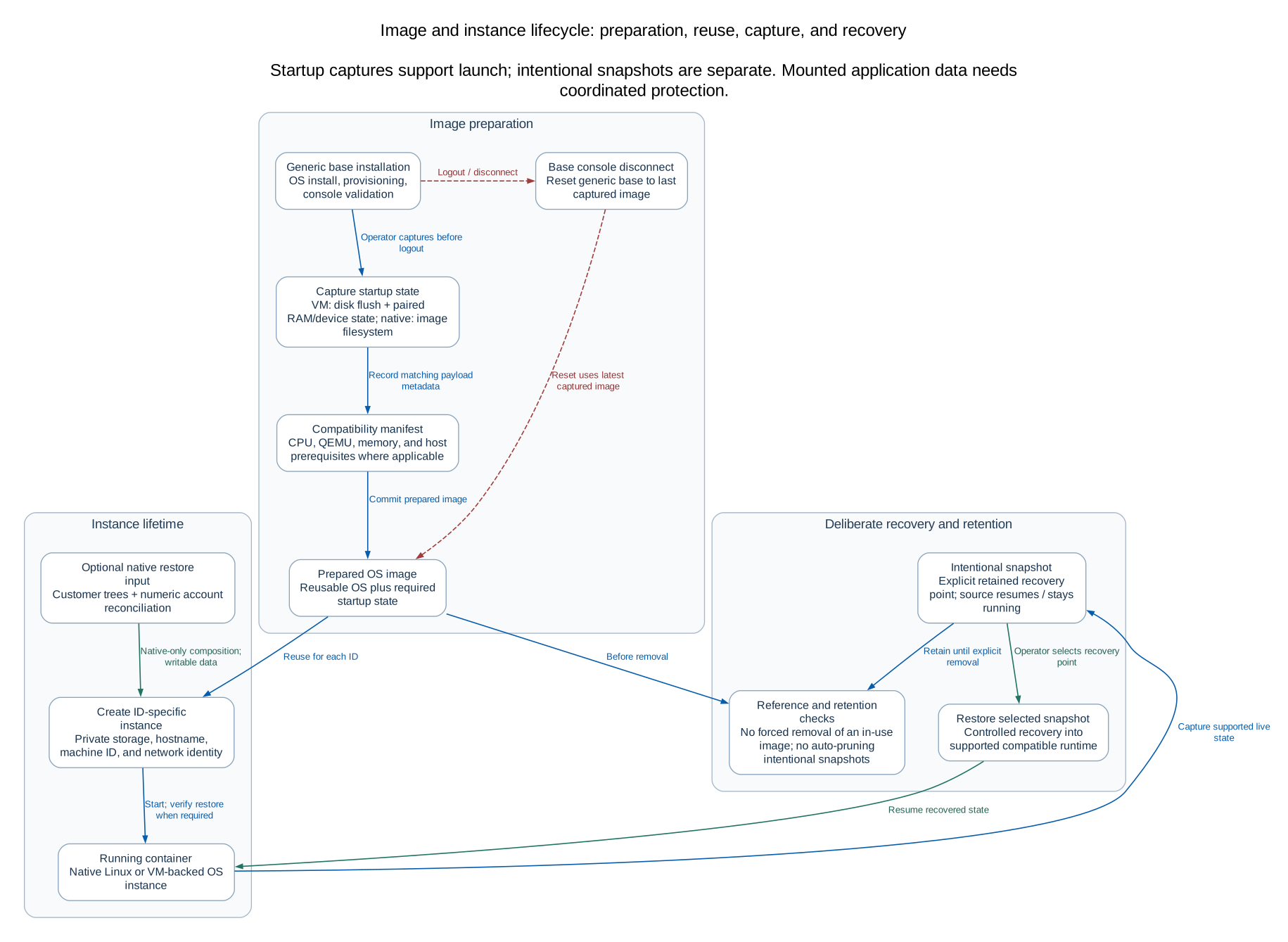 Open full-size diagram
Editable Mermaid source
API
Use an admin API key for PUT /mykos/api/v2/images/OS/build with optional
username, password and replace JSON fields. The request starts the build
in mykos-image-build@OS.service. Read progress with an API key at
GET /mykos/api/v2/images/OS/build or from the command:
sudo /usr/local/sbin/mykos-image-build OS --status
sudo journalctl -u mykos-image-build@OS.service --no-pager
Image build workers are included in maintenance checks and explicit Purge.
RPM upgrades do not start builds, remove stored images, or restart guests.
SQL Server on native Linux
Operator kickstarts such as pos/ks/mssql2022.ks use the existing native
Linux image build and commit workflow in the text menu. The Microsoft SQL
Server pane recognizes mssql2022 and mssql2025, showing only available
images by default. The pane uses native Linux lifecycle, root console and
snapshot operations; it does not create a Windows VM. SQL product versions
come from the image name, without probing the running guest. The show-all
leaf includes disabled choices and sample rows when no SQL images exist.
Retrying a failed image commit
If saving or committing an image fails after its disk/RAM capture completes,
MYKOS retains the matching capture and the existing installed builder. Resolve
the reported storage or Podman error, then repeat the same image build command.
The retry continues the saved commit without reinstalling, rebooting the guest,
or capturing its memory again. A previous prepared image remains available
until the replacement commit succeeds. Do not use --replace for this retry.
The capture and embedded installed-disk archive need sufficient free space on
their respective filesystems. Check both the MYKOS VM storage and Podman image
storage when diagnosing an out-of-space error. Changing Podman storage is a
separate operator task; an RPM update does not move existing images or disks.
Rocky Linux and AlmaLinux native images
The text menu accepts rocky8, rocky9, rocky10, alma8, alma9, and
alma10. These use the same kickstart → livemedia-creator rootfs → Podman
build/commit → running generic base workflow as RedHat. Recipes live in
pos/ks/OS.ks; each EL vendor recipe derives from the corresponding operator
rh8.ks, rh9.ks, or rh10.ks, preserving its package list and post-install
customizations. The original RedHat kickstarts remain unchanged. Use an
Anaconda/Lorax build environment that accepts the prepared kickstart. All native
Linux selections follow the operator's local workflow, including RH9-on-RH8,
without a host-major restriction. Temporary build copies adapt timesource and
weak-dependency option spellings to the installed parser; saved kickstarts stay
unchanged. Actual installer and repository compatibility is checked during the build.
Rocky sources BaseOS and AppStream directly from
https://dl.rockylinux.org/pub/rocky/MAJOR/REPOSITORY/x86_64/os/.
AlmaLinux uses its published installation trees at
https://repo.almalinux.org/almalinux/MAJOR/REPOSITORY/x86_64/kickstart/.
Vendor release packages, repository definitions, and signing keys remain in the
installed filesystem. These recipes do not use the private RHEL mirror or
download its update script. No Pipework/eth1/DHCP-client dependency is added.
Once built, separate Rocky Linux and AlmaLinux panes appear. They support the
same native Linux lifecycle, root terminal, VPN and snapshot actions. The
show-all leaf supplies disabled 8/9/10 choices and sample rows when no image
is available. The staging API advertises the same OS identifiers; snapshot OS
identity and full minor versions come from image metadata, without guest probes.
Oracle Linux uses oracle8, oracle9, and oracle10, from Oracle's public
https://yum.oracle.com/repo/OracleLinux/OLMAJOR/baseos/latest/x86_64/ and
.../OLMAJOR/appstream/x86_64/ repositories. Kernel and UEK packages are
excluded: native containers share the host kernel.
CentOS uses centos8, centos9, and centos10, meaning CentOS Stream. Stream 9 and 10 use
https://mirror.stream.centos.org/MAJOR-stream/{BaseOS,AppStream}/x86_64/os/.
Stream 8 uses the archived official BaseOS/AppStream trees at
https://vault.centos.org/8-stream/, including saved runtime repo definitions
with RPM signature checks enabled. This archive receives no further updates.
CentOS Linux is not included. Fedora uses
fedora43 and fedora44, the two newest stable releases in the official
release feed when added. The beta release is excluded. Its Everything install
tree and matching updates repository come from https://dl.fedoraproject.org/.
Fedora kickstarts are prepared and validated with the installed local parser, without requiring a Fedora host. The existing Anaconda/Lorax build performs the actual repository/package compatibility checks.
RedHat's updateos script is downloaded and syntax-checked on the build host,
then copied into the image with executable permissions. Minimal kickstarts do
not need a guest curl package for this step. Download or validation failures
stop before Podman builds the image.
In the text menu, choose c, then enter all to build the 16 EL images
sequentially: RedHat 7–10 and Rocky Linux, AlmaLinux, Oracle Linux and CentOS
Stream 8–10. Existing local images are reused. A failed build stops the batch
before another installer starts; completed images remain available. Correct the
reported error and clear any failed installer workspace before retrying all.
Fedora, SQL Server and desktop VM images remain individual selections.
Image installation runs at nice +1 (slightly below normal CPU priority); the menu and regular containers retain their
normal priority. VM image builders reset their build-priority setting for regular
instances.
Update an existing image
Administrators can use Connect to running base image on a prepared image row.
This connects to the generic base itself: su - root for native Linux, the direct
Ubuntu guest serial terminal, PowerShell for Windows, or the macOS SSH shell.
The base must be running; connecting does not create an instance or restart it.
After making changes, keep the console connected and select f. Capture image
in a separate text-menu session, enter the image OS, and confirm its exact name.
Wait for capture to finish before logging out or closing the console. Native Linux commits
the base filesystem with a brief pause and leaves it running. VM images refresh
their paired disk/RAM startup capture, commit the installed disk, and restart the
generic base from the saved state. Existing ID-specific containers and intentional
snapshots retain their original state. Capture native images after package updates
have completed; external mounted data is not part of a Podman filesystem commit.
Base console sessions
Base-image logins guard common shutdown and reboot commands. These are session
safeguards against accidental power actions, not a security sandbox for an
administrator with root access. Regular ID-specific console sessions are unchanged.
Only one base-image console can be open for an OS at a time.
Capture changes before logging out or closing the console. The server queues
a reset when the console disconnects, including browser-window closure. Reset
recreates only the generic base from its latest captured image and, for VMs, the
matching saved disks/RAM. It never commits uncaptured edits. Capture is serialized
with reset, so a completed capture becomes the reset source. Existing ID-specific
containers, intentional snapshots and OS images are preserved. Reset failures
appear on the image row and can be retried using Reset base to captured image.
Lifecycle checks and recovery
An image is the reusable installed OS plus startup device/memory state where
needed. A container is an ID-specific instance with its own IP/hostname and
private writable state. A snapshot deliberately captures live instance state
and leaves that instance running. Automatic startup captures are required runtime
artifacts, separate from intentional snapshots; do not prune intentional snapshots
as though they were temporary build files.
Stop/start of an existing container preserves its existing writable filesystem;
it does not refresh it from a newly captured image. To use a changed image for a
new instance, preserve customer data first and deliberately recreate the intended
instance. Never delete/recreate a customer container merely to test documentation.
A snapshot restore is an explicit state-changing operation; inspect the source ID,
OS, capture and storage requirements before confirmation.
In release146, the base resolver requires the exact generic base to be running and
unpaused with the expected labels/image. A failed or busy base console is not a
reason to replace an image or an ID-specific instance. Inspect the image job and
helper errors first. Capture failures preserve the previous captured image; resolve
the reported error and retry the intended operation. Disconnect reset failures
remain visible on the image row and can be retried explicitly. Root-console power
guards are accidental-operation safeguards, not an authorization boundary.
Generated native build copies add -linux-firmware, -*-firmware and
-microcode_ctl exclusions and add --exclude-prefix=/run/nologin and
--exclude-prefix=/var/run/nologin to boot tmpfiles commands. Native containers share the host kernel and
must not perform hardware firmware updates or leave root console logins blocked.
These edits apply to generated copies in pos/prepare_ks.py; retain the operator's
original kickstarts, including local repository and application fixes.